QNX joins Ford, Toyota, and other industry leaders to help drive new standard for app integration.
Paul Leroux
For as long as I can remember, QNX Software Systems has been at the forefront of integrating cars and smartphones. Through our flexible OS architecture and large automotive ecosystem, we provide automakers and Tier 1 suppliers with the ultimate choice in connectivity options for smartphones and other smart devices. And now, QNX customers will have even greater choice, with the availability of Ford’s SmartDeviceLink (SDL) technology for the QNX CAR Platform for Infotainment.
If you’ve never heard of SDL, it’s the open source version of Ford AppLink, the software that allows Ford SYNC users to access smartphone apps through voice commands and dashboard controls. Ford donated AppLink to the open source community to create a standard way for consumers to interact with smartphone apps, regardless of which phone they use or vehicle they drive.
SDL is quickly gaining industry advocates, including Toyota, UI Evolution, and, of course QNX. What’s more, companies like PSA, Honda, Subaru, Mazda are evaluating it for use in next-generation vehicles.
Why the interest in SDL? Because it’s a flexible, vendor-neutral standard that can benefit drivers, automakers, and developers alike. With SDL:
Drivers can interact with apps by using voice commands, steering-wheel buttons, and other in-car controls, so they can keep their eyes on the road and hands on the wheel.
Automakers can deliver a consistent app experience across vehicles, while retaining the flexibility to customize that experience for each vehicle brand or model.
Developers can create apps that can work across multiple smart devices and multiple automotive brands — which means they have greater incentive to create automotive apps.
SDL for QNX builds on a history of successful collaborations between Ford and QNX, including the QNX-powered Ford SYNC 3 infotainment system. According to Paul Elsila, CEO of Livio, the Ford subsidiary that maintains the SDL open source project, “With its large market share, QNX can play a key role in driving the adoption of auto industry standards, and we are excited to work with them in building vendor-neutral technology that can simplify the integration of smartphone apps in any brand or type of vehicle.”
SDL works with multiple smartphone platforms. Moreover, it is highly flexible: it can work across a full range of vehicles, from entry-level to premium, and across a wide range of displays. It can even be used in systems without displays — for instance, in systems that use a voice interface.
To learn more about SDL, check out the announcements that Ford, Toyota, and QNX issued this morning.
Building a head unit that needs to sync with smartphones, media players, memory cards, and USB sticks? With the QNX CAR Platform, you won’t be left to your own devices.
Paul Leroux
In previous posts, I discussed how the QNX CAR Platform for Infotainment is adept at juggling multiple concurrent tasks. For instance, it can perform 3D navigation, process voice signals, provide active noise control, display vehicle data, manage audio, run multiple application environments, and still deliver a fast, responsive user experience. If that’s not enough, it can also detect and play content from an array of media devices, including local drives, SD cards, and iPods, as well as Bluetooth, DLNA, and MTP devices.
When plugging a media device into a car’s head unit, most users expect immediate access to the device content; they also want to browse the content by metadata, such as genre, title, or artist. To present this content, the head unit must perform metadata synching. The question is, how can the head unit make the content instantly available, even when the media device contains thousands of files that may take many seconds or even minutes to fully synchronize?
To complicate matters, users often want to switch from one media source to another. For instance, a user listening to music stored on a DLNA device may ask the head unit to switch to an Internet radio station. From the user’s perspective, the switch should be fast, simple, and intuitive.
Handling device attachments (and
detachments) gracefully.
The head unit must also cope with the vagaries of user behavior. For instance, if the user yanks out a USB media stick during synching or playback, the system should recover gracefully; it should also provide appropriate feedback, such as displaying a menu that asks the user to choose from another media source. Likewise, if the user yanks out the media device and re-inserts it, the system shouldn’t get confused. Rather, it should simply resume synching content where it left off.
Handling scenarios like these is the job of the QNX CAR Platform’s multimedia architecture.
Architecture at a glance
The multimedia architecture integrates several software components to automatically detect media devices, synchronize metadata with media databases, browse the contents of devices, and, of course, play audio and video files. Together, these components form three layers:
Human machine interface, or HMI
Multimedia components
OS services
Let’s look at each of these layers in turn, starting with the HMI.
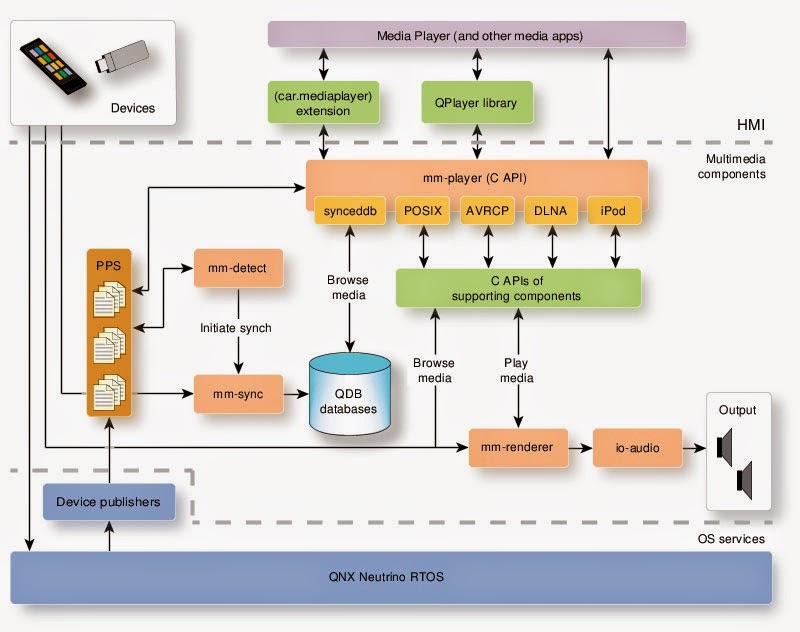
At the top of the HMI layer, you’ll see the Media Player, a reference application that allows end-users to control media browsing and playback. Developers can customize this player or write their own player apps, using APIs provided by the QNX CAR Platform.
The Media Player comes in two flavors, HTML5 and Qt 5. To communicate with the architecture’s multimedia engine (mm-player), the HTML5 version uses the car.mediaplayer JavaScript API while the Qt version uses the QPlayer library. In addition to these interfaces, custom apps can use the multimedia engine’s C API. All three interfaces — car.mediaplayer, QPlayer, and C API — provide an abstraction layer that allows a media player app to:
retrieve a list of accessible media sources: local drives, USB storage devices, iPods, etc.
retrieve track metadata: artist name, album name, track title, etc.
start and stop playback
jump to a specific track
handle updates in playback state, media sources, and track position
The interfaces that provide access to these operations aren’t specific to any device type, so player apps can work with a wide variety of media hardware.
The media player can quickly access and display a variety of metadata (artist name, album name, track title, etc.) stored in a small-footprint SQL database.
Multimedia components layer
If you look at the top of the multimedia components layer, you’ll see a box labeled mm-player; this is the architecture’s media browsing and playback engine. The mm-player does the dirty work of retrieving metadata, starting playback, jumping to a specific track, etc., which makes custom player apps easier to design. It also supports a large variety of media sources, including:
local drives
USB storage devices
Apple iPod devices
DLNA devices, including phones and media players
MTP devices, including PDAs and media players
devices paired through Bluetooth
To perform media operations requested by a client media player, mm-player works in concert with several lower-level components that help navigate media-store file systems, read metadata from media files, and manage media flows during playback. The components include a series of plugins (POSIX, AVRCP, DLNA, etc.) that interface with different device types. For instance, let’s say you insert an SD card. The POSIX plugin supports this type of device, so it will learn of the insertion and inform mm-player of the newly connected media source; it will also support any subsequent media operations on the SD card.
If you look again at the diagram, you’ll see several other components that provide services to mm-player. These include:
mm-detect — discovers media devices and initiates synchronization of metadata
mm-sync — synchronizes metadata from tracks and playlists on media devices into small-footprint SQL databases called QDB databases
mm-renderer — plays audio and video tracks, and reports playback state
io-audio — starts audio device drivers to enable the output of audio streams
OS services layer
The lowest layer of the multimedia architecture includes device drivers and protocol stacks that, among other things, detect whether the user has inserted or removed any media device. The following diagram summarizes what happens when one of these services detects an insertion:
User inserts the device.
The corresponding driver or protocol stack informs device publishers of the insertion.
The publishers write the device information to Persistent Publish Subscribe (PPS) objects in a directory monitored by the mm-detect service. (Read my previous posts here and here to learn how QNX PPS messaging enables loosely coupled, easy-to-extend designs.)
To start synchronizing the device’s metadata, mm-detect loads the device’s QDB database into memory and passes the device’s mountpoint and database name to mm-sync.
mm-sync synchronizes the metadata of all media files on the device.
mm-sync uses media libraries to read file paths and other information from media tracks found on the device. It then copies the extracted metadata into the appropriate database tables and columns. Applications can then query the QDB database to obtain metadata information such as track title and album name.
These steps may describe how the architecture detects and synchronizes with devices, but they can't capture the efficiency of the architecture and how it can deliver a fast, responsive user experience. For that, I invite you to check out this video on the QNX CAR Platform. The section on multimedia synchronization starts at the 1:32 mark, but I encourage you to watch the whole thing to see how the platform performs multimedia operations while concurrently managing other tasks:
Media browsing and playback
I’ve touched on how the multimedia architecture automatically detects and synchronizes devices. But of course, it does a lot more, including media browsing and media playback. To learn more about these features, visit the QNX CAR Platform documentation on the QNX website.
Previous posts in the QNX CAR Platform series:
A question of getting there — wherein I examine how the platform gives customers the flexibility to choose from a variety of navigation solutions
A question of architecture — wherein I discuss how the platform simplifies the challenge of integrating multiple disparate technologies, from graphics to silicon
A question of concurrency — wherein I address the a priori question: why does the auto industry need a platform like QNX CAR in the first place?
QNX has been building NFC functionality into concept cars since 2011. Now, with the advent of automotive-grade tags and chips, NFC may be coming to a dashboard near you.
Paul Leroux
Why does QNX transform vehicles like the Maserati QuattroPorte GTS, Mercedes-Benz CLA45, and Bentley Continental into technology concept cars? I can think of many reasons, but three stand out. First, the cars allow us to demonstrate the inherent flexibility and customizability of QNX technology. If you could put all of the cars side by side, you would quickly see that, while they all use the same QNX platform, each has a unique feature set and a distinctive look-and-feel — no two are alike. This flexibility is of immense importance to automakers, who, for reasons of market differentiation, need to deliver a unique brand experience in each marque or vehicle line. Alf Pollex, Head of Connected Car and Infotainment at Volkswagen, says it best: “the QNX platform... enables us to offer a full range of infotainment systems, from premium level to mass volume, using a single, proven software base.”
Second, the cars explore how thoughtful integration of new technologies can make driving easier, more enjoyable, and perhaps even a little safer. Case in point: the Maserati’s obstacle awareness display, which demonstrates how ADAS systems can aggregate data from ultrasonic and LiDAR sensors to help drivers become more aware of their surroundings. This display works much like a heads-up display, but instead of providing speed, RPM, or navigation information, it offers visual cues that help the driver gauge the direction and proximity of objects around the vehicle — pedestrians, for example.
Look ma, no menus: At 2012 CES, a QNX concept car
showcased how NFC can enable single-tap Bluetooth
phone pairing. Source CrackBerry.com
Third, the cars explore solutions that address real and immediate pain points. Take, for example, the pairing of Bluetooth phones. Many consumers find this task difficult and time-consuming; automakers, for their part, see it as a source of customer dissatisfaction. So, in 2011, we started to equip some of our concept cars with near field communication (NFC) technology that enables one-touch phone pairing. This pairing is as easy it sounds: you simply touch an NFC-enabled phone to an NFC tag embedded in the car’s console, and voilà, pairing with the car’s infotainment system happens automatically.
Prime time NFC in the car holds much promise, but when, exactly, will it be ready for prime time? Pretty soon, as it turns out. In a recent article, “NFC looks to score big in cars,” Automotive Engineering International points to several vendors, including Broadcom, NXP, Melexis, Texas Instruments and ams AG, that have either announced or shipped automotive-grade NFC solutions. NXP, for example, expects that some of its NFC tags and chips will first go into production cars around 2016.
Mind you, NFC isn’t just for phone pairing. It can, for example, enable key-fob applications that allow phones to store user preferences for seat positions and radio stations. It can also enable use cases in which multiple drivers operate the same vehicle, such as car sharing or fleet management. The important thing is, it’s moving from concept to production, marking one more step in the seamless integration of cars and smartphones.
Did you know…
BMW embeds NFC tags not only in its cars, but also in print ads.
IHS has predicted that, in 2018, global shipments of NFC-equipped cellphones will reach 1.2 billion units.
NFC World publishes a living document that lists all of the NFC handsets available worldwide.
By Megan Alink, Director of Marketing Communications for Automotive
Recently, my colleagues Paul Leroux and Matt Young showed off a shiny new infographic that enlightens readers to the many ways they encounter QNX-based systems in daily life (here and here). After three-and-a-half decades in business we’ve certainly been around the block a time or two, and you might think things are getting a bit stale. As the infographic shows, that couldn’t be further from the truth here at QNX. From up in the stars to down on the roads; in planes, trains, and automobiles (and boats too); whether you’re mailing a letter or crafting a BBM on your BlackBerry smartphone, the number and breadth of applications in which our customers deploy QNX technology is simply astounding.
For those who like some sound with their pictures, we also made a video to drive home the point that, wherever you are and whatever you do, chances are you’ll encounter a little QNX. Check it out:
By Megan Alink, Director of Marketing Communications for Automotive
It’s a fact — a person simply can’t be in two places at one time. I can’t, you can’t, and the demo team at QNX can’t (especially when they’re brainstorming exciting showcase projects for 2016… but that’s another blog. Note to self.) So what’s a QNX-loving, software-admiring, car aficionado to do when he or she has lost touch and wants to see the latest on the QNX CAR Platform for Infotainment? Video, my friends.
One of the latest additions to our QNX Cam YouTube channel is an update to a video made just over two and a half years ago, in which my colleague, Sheridan Ethier, took viewers on a feature-by-feature walkthrough of the QNX CAR Platform. Now, Sheridan’s back for another tour, so sit back and enjoy a good, old-fashioned catch-up with what’s been going on with our flagship automotive product (with time references, just in case you’re in a bit of a hurry).
Sheridan Ethier hits the road in the QNX reference vehicle based on a modified Jeep Wrangler, running the latest QNX CAR Platform for Infotainment.
We kick things off with a look at one of the most popular elements of an infotainment system — multimedia. Starting around the 01:30 mark, Sheridan shows how the QNX CAR Platform supports a variety of music formats and media sources, from the system’s own multimedia player to a brought-in device. And when your passenger is agitating to switch from the CCR playlist on your MP3 device to Meghan Trainor on her USB music collection, the platform’s fast detection and sync time means you’ll barely miss a head-bob.
The QNX CAR Platform’s native multimedia player — the “juke box” — is just one of many options for enjoying your music.
About five minutes in, we take a look at how the QNX CAR Platform implements voice recognition. Whether you’re seeking out a hot latté, navigating to the nearest airport, or calling a co-worker to say you’ll be a few minutes late, the QNX CAR Platform lets you do what you want to do while doing what you need to do — keeping your hands on the wheel and your eyes on the road. Don’t miss a look at concurrency (previously discussed here by Paul Leroux) during this segment, when Sheridan runs the results of his voice commands (multimedia, navigation, and a hands-free call) smoothly at the same time.
Using voice recognition, users can navigate to a destination by address or point of interest description (such as an airport).
At eight minutes, Sheridan tells us about one of the best examples of the flexibility of the QNX CAR Platform — its support for application environments, including native C/C++, Qt, HTML5, and APK for running Android applications. The platform’s audio management capability makes a cameo appearance when Sheridan switches between the native multimedia player and the Pandora HTML5 app.
Pandora is just one of the HTML5 applications supported by the QNX CAR Platform.
As Sheridan tells us (at approximately 12:00), the ability to project smartphone screens and applications into the vehicle is an important trend in automotive. With technologies like MirrorLink, users can access nearly all of the applications available on their smartphone right from the head unit.
Projection technologies like MirrorLink allow automakers to select which applications will be delivered to the vehicle’s head unit from the user’s connected smartphone.
Finally, we take a look at two interesting features that differentiate the QNX CAR Platform — last mode persistence (e.g. when the song you were listening to when you turned the car off starts up at the same point when you turn the car back on) and fastboot (which, in the case of QNX CAR, can bring your backup camera to life in 0.8 seconds, far less than the NHTSA-mandated 2 seconds). These features work hand-in-hand to ensure a safer, more enjoyable, more responsive driving experience.
Fastboot in 0.8 seconds means that when you’re ready to reverse, your car is ready to show you the way.
Interested in learning more about the QNX CAR Platform for Infotainment? Check out Paul Leroux’s blog on the architecture of this sophisticated piece of software. To see QNX CAR in action, read Tina Jeffrey’s blog, in which she talks about how the platform was implemented in the reimagined QNX reference vehicle for CES 2015.
QNX technology is in cars — lots of them. But it’s also in everything from planes and trains to smart phones, smart buildings, and smart vacuum cleaners. If you're interested, I happen to have an infographic handy...
I was a lost and lonely soul. Friends would cut phone calls short, strangers would move away from me on the bus, and acquaintances at cocktail parties would excuse themselves, promising to come right back — they never came back. I was in denial for a long time, but slowly and painfully, I came to the realization that I had to take ownership of this problem. Because it was my fault.
To by specific, it was my motor mouth. Whenever someone asked what I did for a living, I’d say I worked for QNX. That, of course, wasn’t a problem. But when they asked what QNX did, I would hold forth on microkernel OS architectures, user-space device drivers, resource manager frameworks, and graphical composition managers, not to mention asynchronous messaging, priority inheritance, and time partitioning. After all, who doesn't want to learn more about time partitioning?
Well, as I subsequently learned, there’s a time and place for everything. And while my passion about QNX technology was well-placed, my timing was lousy. People weren’t asking for a deep dive; they just wanted to understand QNX’s role in the scheme of things.
As it turns out, QNX plays a huge role, and in very many things. I’ve been working at QNX Software Systems for 25 years, and I am still gobsmacked by the sheer variety of uses that QNX technology is put to. I'm especially impressed by the crossover effect. For instance, what we learn in nuclear plants helps us offer a better OS for safety systems in cars. And what we learn in smartphones makes us a better platform supplier for companies building infotainment systems.
All of which to say, the next time someone asks me what QNX does, I will avoid the deep dive and show them this infographic instead. Of course, if they subsequently ask *how* QNX does all this, I will have a well-practiced answer. :-)
Did I mention? You can download a high-res JPEG of this infographic from our Flickr account and a PDF version from the QNX website.
Stay tuned for 2015 CES, where we will introduce even more ways QNX can make a difference, especially in how people design and drive cars.
And lest I forget, special thanks to my colleague Varghese at BlackBerry India for conceiving this infographic, and for the QNX employees who provided their invaluable input.
Earlier this month, QNX Software Systems officially released QNX Acoustics for Voice 3.0 — the company’s latest generation of acoustic processing software for automotive hands-free voice communications. The solution sets a new benchmark in hands-free quality and supports the rigorous requirements of smartphone connectivity specifications. Designed as a complete software solution, the product includes both the QNX Acoustics for Voice signal-processing library and the QWALive tool for tuning and configuration. The signal-processing library manages the flow of audio during a hands-free voice call. It defines two paths: the send path, which handles audio flowing from the microphones to the far end of the call, and the receive path, which handles audio flowing from the far end to the loudspeakers in the car: QWALive, used throughout development and pre-production phases, gives developers realtime control over all library parameters to accelerate tuning and diagnosis of audio issues: A look under the hood QNX Acoustics for Voice 3.0 builds on QNX Software Systems’ best-in-class acoustic echo cancellation and noise reduction algorithms, road-proven in tens of millions of cars, and offers breakthrough advancements over existing solutions. Let me run through some of the innovative features that are already making waves (sorry, couldn’t resist) among automotive developers. Perhaps the most significant innovation is our high efficiency technology. Why? Well, simply put, it saves up to 30% both in CPU load and in memory requirements for wideband (16 kHz sample rate for HD Voice) and Wideband Plus (24 kHz sample rate). This translates into the ability to do more processing on existing hardware, and with less memory. For instance, automakers can enable new smartphone connectivity capabilities on current hardware, without compromising performance: Another feature that premieres with this release is intelligent voice optimization technology, designed to accelerate and increase the robustness of send-path tuning. This technology implements an automated frequency response correction model that dynamically adjusts the frequency response of the send path to compensate for variations in the acoustic path and vehicle cabin conditions. Dynamic noise shaping, which is exclusive to QNX Acoustics for Voice, also debuts in this release. It enhances speech quality in the send path by reducing broadband noise from fans, defrost vents, and HVAC systems — a welcome feature, as broadband noise can be particularly difficult for hands-free systems to contend with. Flexibility and portability — check and check Like its predecessor (QNX Aviage Acoustic Processing 2.0), QNX Acoustics for Voice 3.0 continues to offer maximum flexibility to automakers. The modular software library comes with a comprehensive API, easing integration efforts into infotainment, telematics, and audio amplifier modules. Developers can choose from fixed- and floating-point versions that can be ported to a variety of operating systems and deployed on a wide range of processors or DSPs. We’re excited about this release as it’s the most sophisticated acoustic voice processing solution available to date, and it allows automakers to build and hone systems for a variety of speech requirements, across all their vehicle platforms. Check out the QNX Acoustics for Voice product page to learn more.
This just in: Audi has announced that its Audi MMI mobile media application framework, which is built on the QNX CAR Platform for Infotainment, will support the new Android Auto connectivity solution.
The new feature will allow drivers to access Android-device car apps using Audi MMI displays and controls, which Audi has optimized for safe and intuitive operation on the road.
Audi states that the MMI system will still maintain its compatibility with other smartphones. Moreover, drivers will be able to switch between the Android view and Audi infotainment functions, as desired.
Audi is a long-standing customer of QNX Software Systems. Audi systems based on QNX technology include the recent Audi Virtual Cockpit and Audi Connect with Google Earth.
Audi plans to introduce Android Auto support in all-new models launched in 2015. For the complete story on Audi support for Android Auto, read the Audi press release.
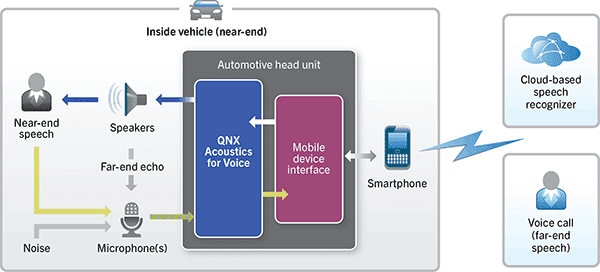
Over the years, Telematics Detroit has become a premier venue for showing off advancements in automotive infotainment, telematics, apps, cloud connectivity, silicon, and more. If the breadth of QNX technology being demonstrated at the show this week is any indication, the event won’t disappoint. Among the highlights is our next-generation acoustics processing middleware — QNX Acoustics for Voice 3.0 — which has been architected to deliver the highest-quality audio for hands-free and speech recognition systems, enabling the ultimate acoustics experience in the car.
What is QNX Acoustics for Voice?
QNX Acoustics for Voice 3.0 is the successor to the QNX Aviage Acoustics Processing Suite 2.0. The new product includes a set of libraries — standard and premium — that offer automakers ultimate flexibility for voice processing in the harsh audio environment of the car.
The standard library provides a full-featured solution for implementing narrowband and wideband hands-free communications, operating at 8 kHz and 16kHz sample rates, respectively. It also includes innovative new features for performing echo cancellation, noise reduction, adaptive equalization, and automatic gain control. Perhaps the most valuable feature, especially for systems constrained by limited CPU cycles, is the high efficiency mode, which can process wideband and higher-bandwidth speech with substantially less CPU load. The net result: more processing headroom for other tasks.
The premium library includes all the standard library functionality, plus support for Wideband Plus, which expands the frequency range of transmitted speech to 50 Hz - 11 kHz, at a 24kHz sample rate. The introduction of Wideband Plus fulfills the higher voice quality and low noise requirements demanded by the latest smartphone connectivity protocols for telephony, VoIP services, and speech recognition. Let me recap with a table:
Supported capabilities
Standard library
Premium library
Narrowband audio: 300 – 3400Hz (8kHz sample rate)
✔
✔
Wideband audio: 50-7000Hz
(16kHz sample rate)
✔
✔
Wideband Plus audio: 50Hz – 11kHz (24kHz sample rate)
✔
High efficiency mode
✔ (Wideband only)
✔
VOIP requirements for new smartphone connectivity protocols
✔
Cloud-based speech recognition requirements for new smartphone connectivity protocols
✔
Why is high-quality speech important in the car?
Simply put, it improves the user experience and can benefit passenger safety. Also, new smartphone connectivity protocols require it. Let’s examine two use cases: hands-free voice calling, and speech recognition.
In a voice call, processing a larger bandwidth of speech and eliminating echo and noise from various sources, including wind, road, vents, fans, and tires, dramatically increases speech intelligibility — and the more intelligible the speech, the more natural the flow of conversation. Also, clearer speech has less impact on the driver’s cognitive load, enabling the driver to pay more attention to the task at hand: driving.
Speech recognition systems are becoming a primary way to manage apps and services in the car. Voice commands can initiate phone calls, select media for playback, search for points of interest (POI), and choose a destination.
Technological advancements in pre-processing voice input to remove noise and disturbances helps speech recognizers detect commands more reliably, thereby achieving higher recognition accuracy. Early speech recognition systems, by comparison, were unintuitive and performed poorly. Drivers became so frustrated that they stopped using these systems and resorted to picking up their smartphones, completely eliminating the safety benefits of speech recognition.
QNX Acoustics for Voice 3.0 is a comprehensive automotive voice solution that includes industry-leading echo cancellation, noise reduction, adaptive equalization and automatic gain control.
If you happen to be at Telematics Update in Novi Michigan this week, be sure to drop by our booth to sit in our latest concept car — a specially modified Mercedes-Benz CLA45 AMG — and experience our acoustics technologies first hand.